Microsoft Edge is the first browser to support Windows 11 accelerated app launches. According to the Microsoft Edge Blog, in a post dated October 29, 2026, the feature makes opening the browser faster and more consistent: most users should see a 15% faster launch, with gains of up to 33% under heavy multitasking.
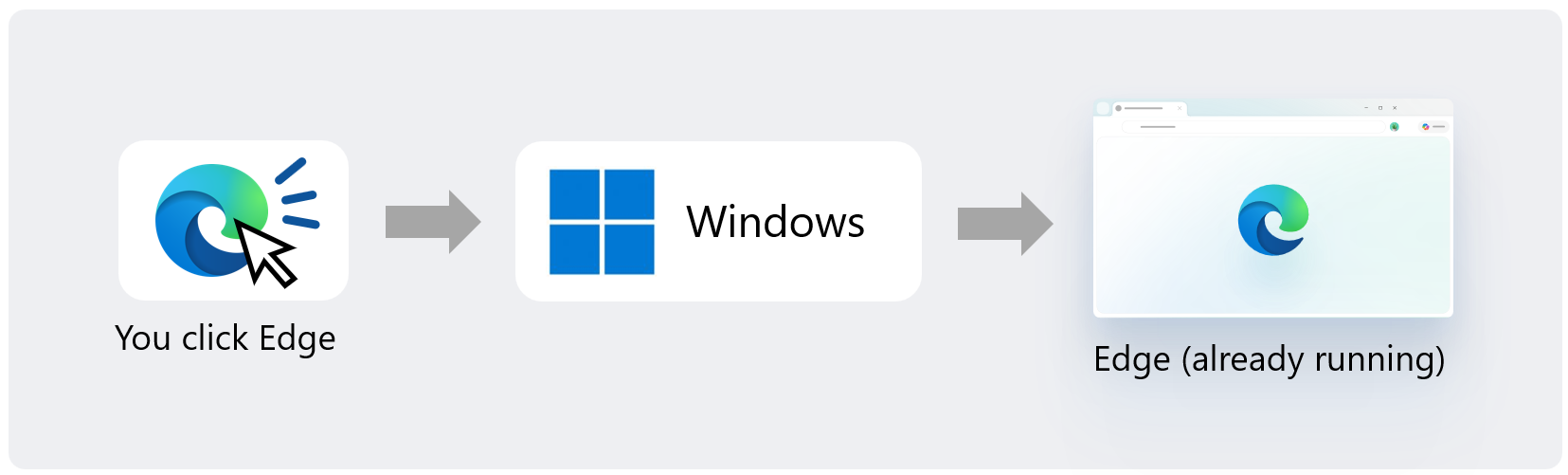
The gain applies when Edge is already running — for example, with a window open or running in the background, as happens with Startup Boost. Previously, clicking a link or the browser icon made Windows start an intermediary process to check whether Edge was already open and only then forward the request. Now, the Edge process registers with Windows when it starts, the system validates that registration, and on the next launch it notifies the already-running process directly, skipping the intermediary.
Accelerated launch works from the Start menu, the taskbar, and supported links that open in Edge as the default browser. To use it, you need Microsoft Edge 150 or later and Windows 11 versions 25H2, 26H2 or 26H1 with the October 2026 non-security update (KB5127936) or later.
One important detail: Microsoft's percentages compare launches with and without the feature when the browser is already running — that is, “warm” launches, not a cold start from a fully closed browser — and the company has not published absolute times. Microsoft also says it is working with the Windows team to bring the same path to opening PDF files, and that it is contributing the work to Chromium, the open-source project Edge is based on, so other Chromium-based browsers can adopt accelerated launches in the future.
Image credit: official diagram from the Microsoft Edge Blog (Microsoft), showing the accelerated launch that notifies the already-running Edge process directly.
Fontes
- Microsoft Edge Blog: Edge is faster on Windows with Accelerated App Launches
- Thurrott: Microsoft Says Edge is the First Windows Browser to Support Accelerated App Launches
- Pureinfotech: Windows 11 can now open running apps faster, and Edge is first to benefit
Transparency note: this article was produced with the assistance of artificial intelligence, based on cross-checking public posts on X and internet sources listed in this article. Check the original sources to confirm the details before sharing.
By Muse