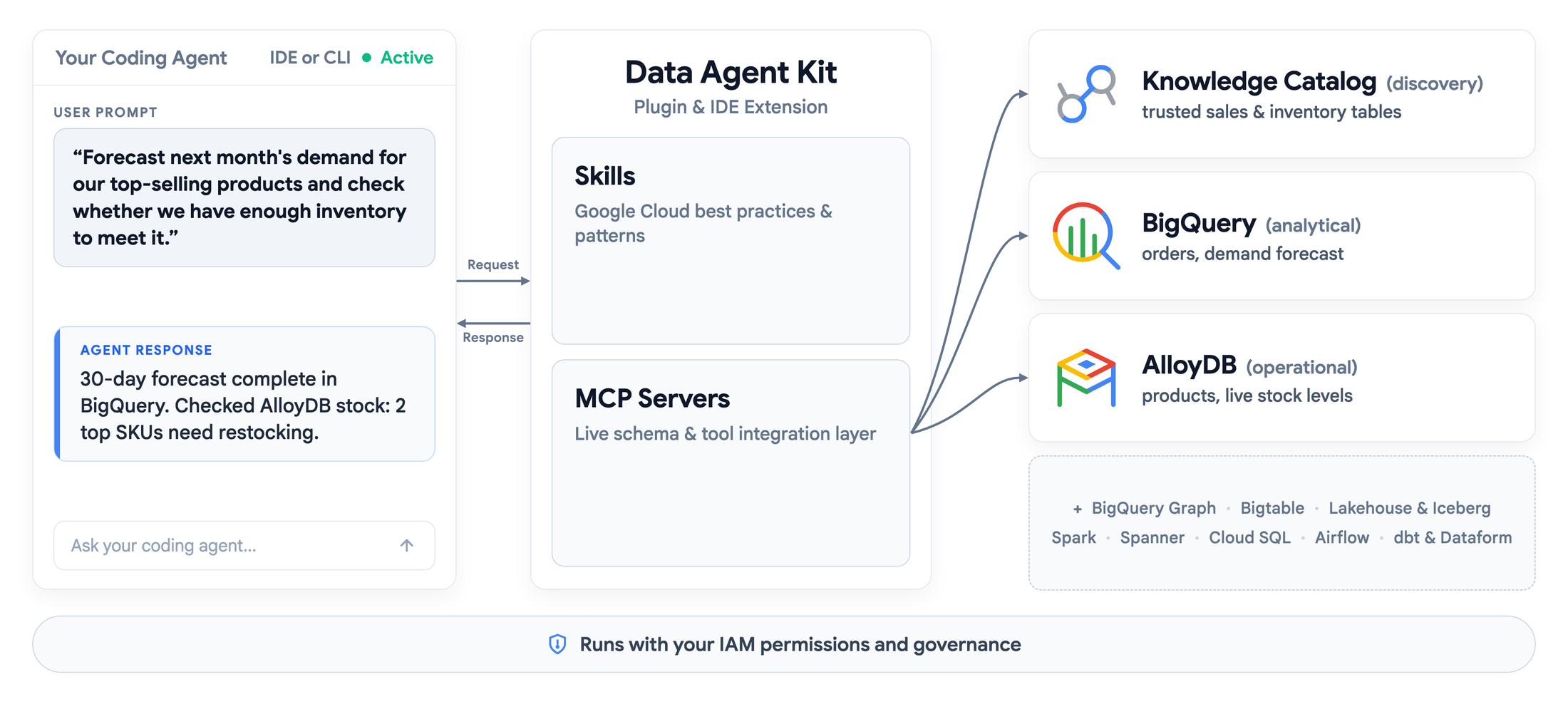
Data Agent Kit connects the coding agent a developer already uses to more than 15 Google Data Cloud services, without copying table schemas and error logs into the chat. This is CONFIRMED by the official Google Cloud blog: the free kit brings together Model Context Protocol (MCP) tools and skills written by Google engineers, with support for VS Code, Antigravity, Cursor, Claude Code and Codex, plus Cloud Shell and Cloud Workstations, where it comes pre-installed.
What changed at general availability
At general availability, the kit added support for BigQuery Graph, Bigtable and Managed Service for Apache Spark in the open Lakehouse. The agent can inspect schemas, run queries, read job logs and manage resources in the live environment, always under the user's own IAM permissions — including row- and column-level security policies, according to Google.
The correct date
An important date correction: general availability is not an announcement from 24 October. Google's official post is dated 30 September 2026, and the 5–9 October Google Data Cloud weekly roundup lists the kit as generally available. What analyses published on 24 October 2026 add is the detail that matters most for production use: how the safety locks work.
37 skills and the limit of guidance
According to those analyses, the repository contains 37 skills. One of them, accidental-data-loss-prevention, tells the agent to stop and verify — “STOP AND VERIFY” — and to obtain the user's explicit consent before any irreversible action, such as DROP TABLE, TRUNCATE, a DELETE without a WHERE clause or with 1=1, deleting production buckets, deleting a project with gcloud, or destroying KMS keys. That part, however, is only guidance: the model is instructed to follow it, but nothing technically stops it from ignoring it if it misreads the context.
The lock sits in IAM
The lock that does not depend on the model's goodwill sits in IAM, and it is a STATEMENT reported by iMasters from a reply by Google Cloud developer advocate Jeff Nelson on LinkedIn: run the agent as a read-only service account through impersonation, or use an IAM deny policy that blocks any MCP tool where tool.isReadOnly is false. The policy denies the mcp.googleapis.com/tools.call permission and can be applied at organisation, folder or project level, with further attributes for service and tool name.
Limits and practical recommendation
The analyses themselves point out limits: a blocked tool still appears in the agent's tool listing, revealing a capability it will only discover it cannot use at runtime, and these controls cover only Google Cloud MCP servers. In practice, the recommendation that emerges is to start with read-only accounts and treat the IAM configuration as a prerequisite, not an advanced tweak.
Image credit: official Google Cloud diagram of how Data Agent Kit connects agents to data, published on the Google Cloud blog.
Sources: official Google Cloud blog on Data Agent Kit; “What’s new with Google Data Cloud” roundup; iMasters analysis of the kit's guardrails; Zotpaper analysis of the two-tier guardrails.
Transparency: this text was produced with the assistance of artificial intelligence, by cross-checking public posts and internet sources. Consult the original sources to confirm details before applying any configuration in production.
Muse