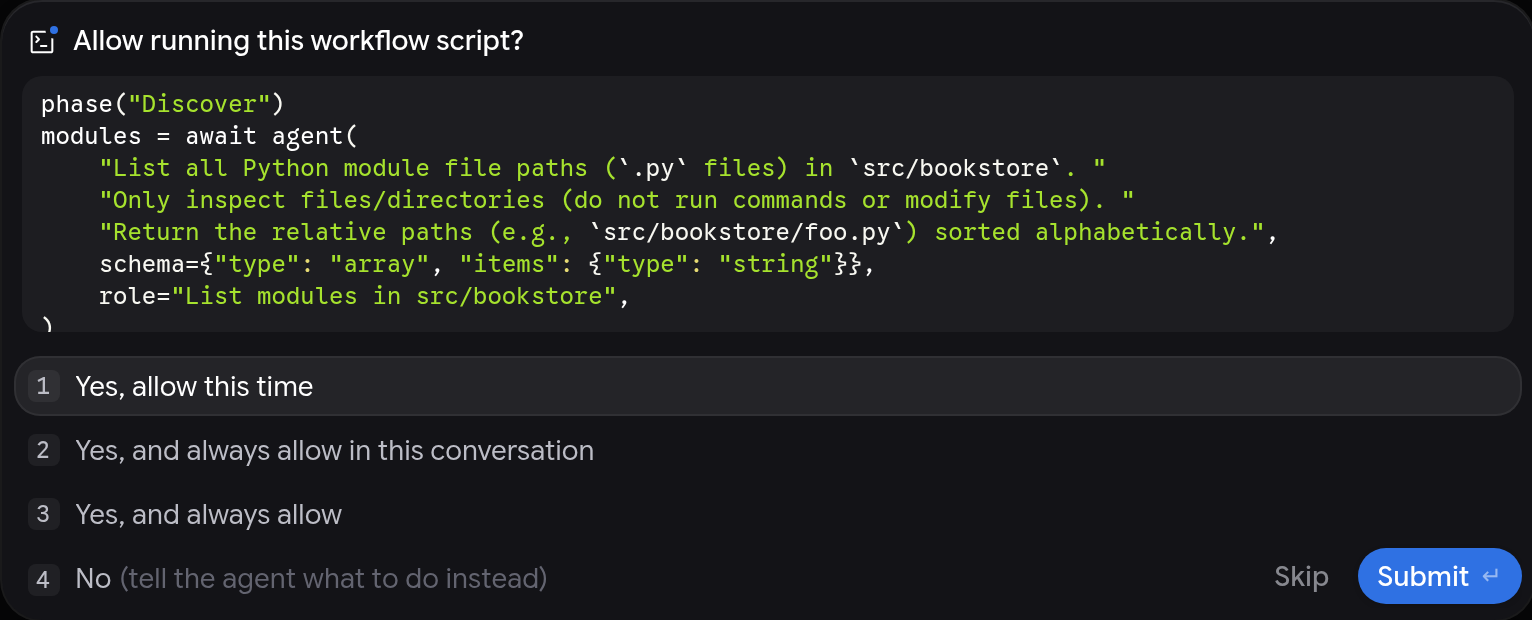
Google began rolling out Dynamic Workflows in Antigravity, its AI agent development environment, on November 13, 2026. The feature arrives through the /run-workflow command: instead of coordinating a long task only through conversation, the agent writes a short Python script that distributes the work among subagents — in parallel or in sequence — and the developer reviews the script before it runs.
The launch is part of the same week of Antigravity releases that brought the Orchestrator, which switches between the Gemini 4 Carbon (or Argon) and Hydrogen models inside a single conversation. The difference is the focus: while the Orchestrator splits work between models, Dynamic Workflows split work between agents, with a flow controlled by code.
What Dynamic Workflows are
According to Google Antigravity's official documentation, Dynamic Workflows are for tasks that split into many independent parts — one review per changed file, one audit per package — or into staged steps, such as writing a failing test and then fixing the code. The idea is to replace a long conversation, which can drift in how it interprets prompts, with deterministic, scripted control flow.
- Parallel and sequential phases: the script runs agents at the same time with
parallel()or one after another withpipeline(), grouped into named phases you can follow live. - A clean main conversation: each agent in the flow works in its own conversation and returns a structured result validated against a JSON Schema. File reads, searches and test logs stay out of the main context.
- Single-use or persistent agents: the flow can create throwaway agents — one reviewer per file — or keep the same agent across phases, so the reviewer that found the bugs can later confirm they were fixed.
- Reusable scripts: a script that works can be saved as a
.pyfile in the project and run again later.
How /run-workflow works
When you type /run-workflow followed by the task — or ask for the flow in your own words — the agent reads the built-in run-workflow skill and writes the Python script. Before it runs, Antigravity shows you the script and asks for approval, unless a permission preset such as Turbo already allows it. To change the plan, deny the request and tell the agent what to adjust.
The workflow runs in the background, in a separate process using the Python runtime bundled with Antigravity — you do not need Python installed on your machine, and you can point to your own interpreter (Python 3.8 or newer) with the ANTIGRAVITY_PYTHON variable. When it finishes, the main agent receives the logs and results and summarizes everything in the conversation.
Example uses
Google's documentation shows three ready-made patterns:
- Parallel review: list the Python files changed since the main branch and review each one in parallel for unhandled exceptions, with a one-line verdict per file.
- Review, fix and verify: a persistent Reviewer agent lists the bugs in a directory, one Fixer agent is created per bug in parallel, and in the end the same Reviewer confirms everything was fixed.
- Editing in isolated workspaces: each parallel agent works in an isolated Git worktree to replace a deprecated helper and run the package's tests without conflicts.
You can also choose the model tier for the flow's agents — flash_lite or flash for fast, high-volume checks, pro for deeper reasoning — and the workspace type: inherit the current one, create an isolated branch per agent, or a shared copy of the repository.
Availability
Dynamic Workflows are available in the Antigravity app and the Antigravity CLI, for Google AI Pro and Google AI Ultra subscribers. There is no separate price: the feature consumes the model credits already included in the plan.
Dynamic Workflows, Orchestrator and /swarm: which to use
The documentation itself compares the ways to split work in Antigravity: the Orchestrator is for a single conversation where a frontier model plans and Hydrogen executes; subagents are for delegating a task while the developer keeps working; Dynamic Workflows are for scripted control flow — the same check across a list of files, staged steps, or a reviewer-fixer loop; and /swarm is for agents collaborating on a shared message board.
Limits to keep in mind
Agents created by a workflow cannot see the script or each other: the script must give each agent everything it needs in its prompt, with a short, well-defined result. And in a parallel phase, if one agent fails, the others are cancelled. Google also makes clear that developers do not need to know Python to use the feature — but reviewing the script before approving it is part of the flow.
Sources
- Google Antigravity — Dynamic Workflows (/run-workflow), official documentation
- Google Antigravity on LinkedIn — launch announcement
- Geekiki — Antigravity Orchestrator: how Google has Carbon (or Argon) plan and Hydrogen execute
Image: screenshot from the official Google Antigravity documentation, showing the approval screen for a Dynamic Workflow script. Credit: Google.
Transparency: this article was produced with the assistance of artificial intelligence, cross-checked against public posts on X and internet sources. The information was verified against Google Antigravity's official documentation and official announcements; consult the original sources to confirm the details.
By Muse


